> ## Documentation Index
> Fetch the complete documentation index at: https://docs.vibess.ai/llms.txt
> Use this file to discover all available pages before exploring further.
# Quickstart
> ⏱️ Setup time: 20 minutes or less
### You'll need:
An active Stripe account with live/test subscriptions
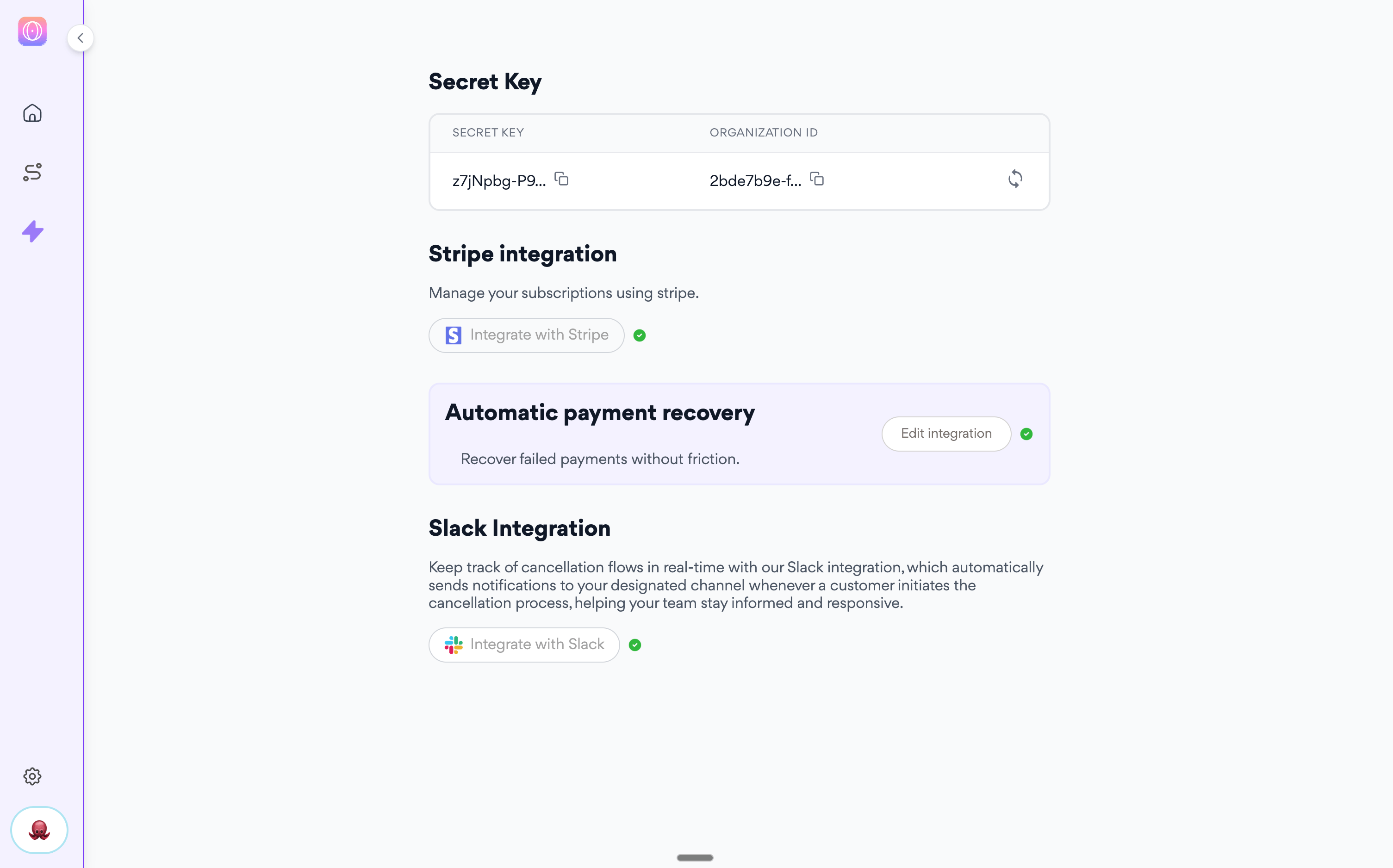
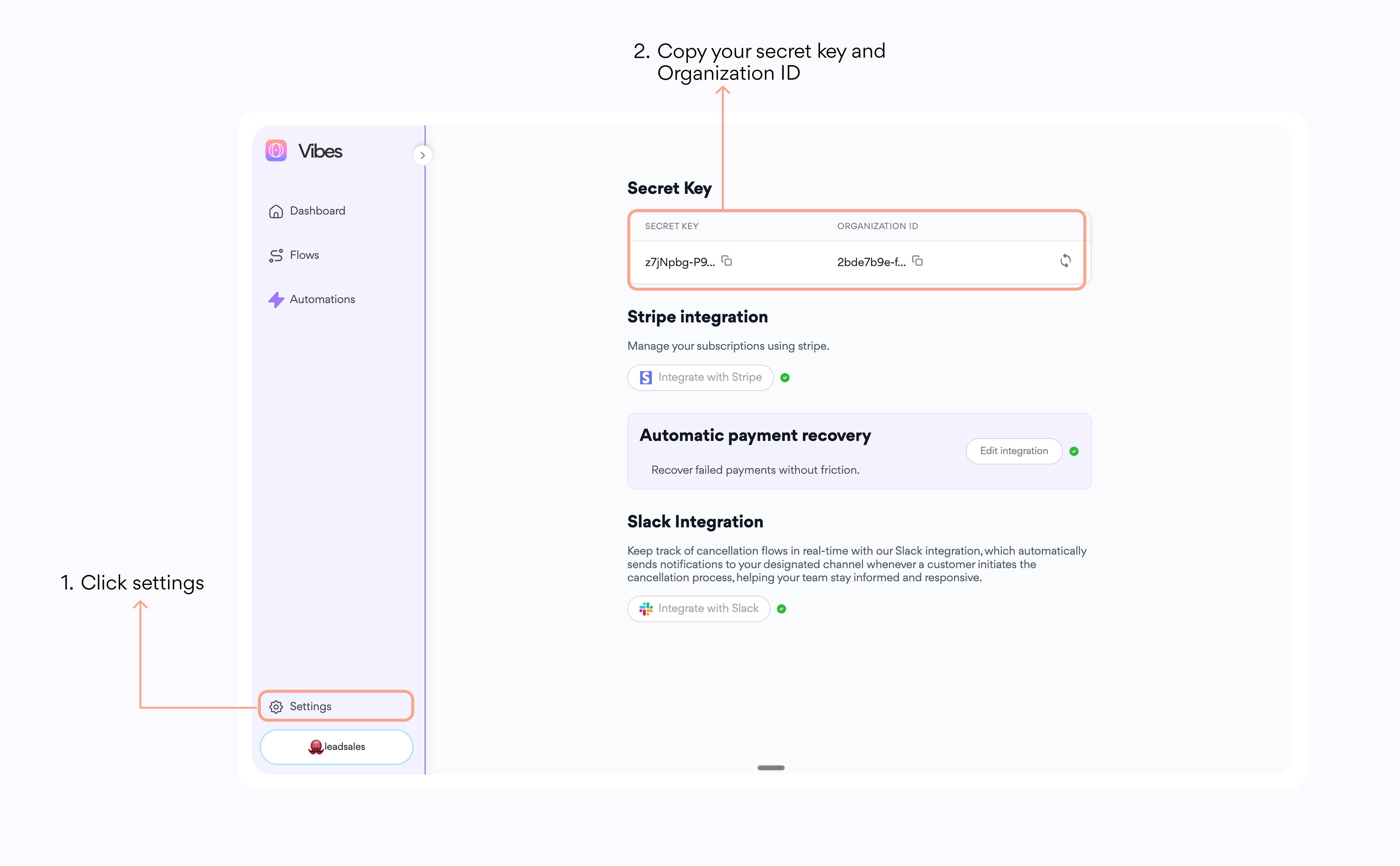
Get your [Vibess.ai](http://Vibess.ai) **Organization ID** and **Secret Key** in your account's settings page.
1. Log in to your account at [https://app.vibess.ai/login](https://app.vibess.ai/login)
2. Go to settings
3. Copy your Organization ID and Secret Key
Ability to add JavaScript to your web app
Developer access for HMAC implementation
## ➡️ Copy your Stripe API Key in your Vibes account
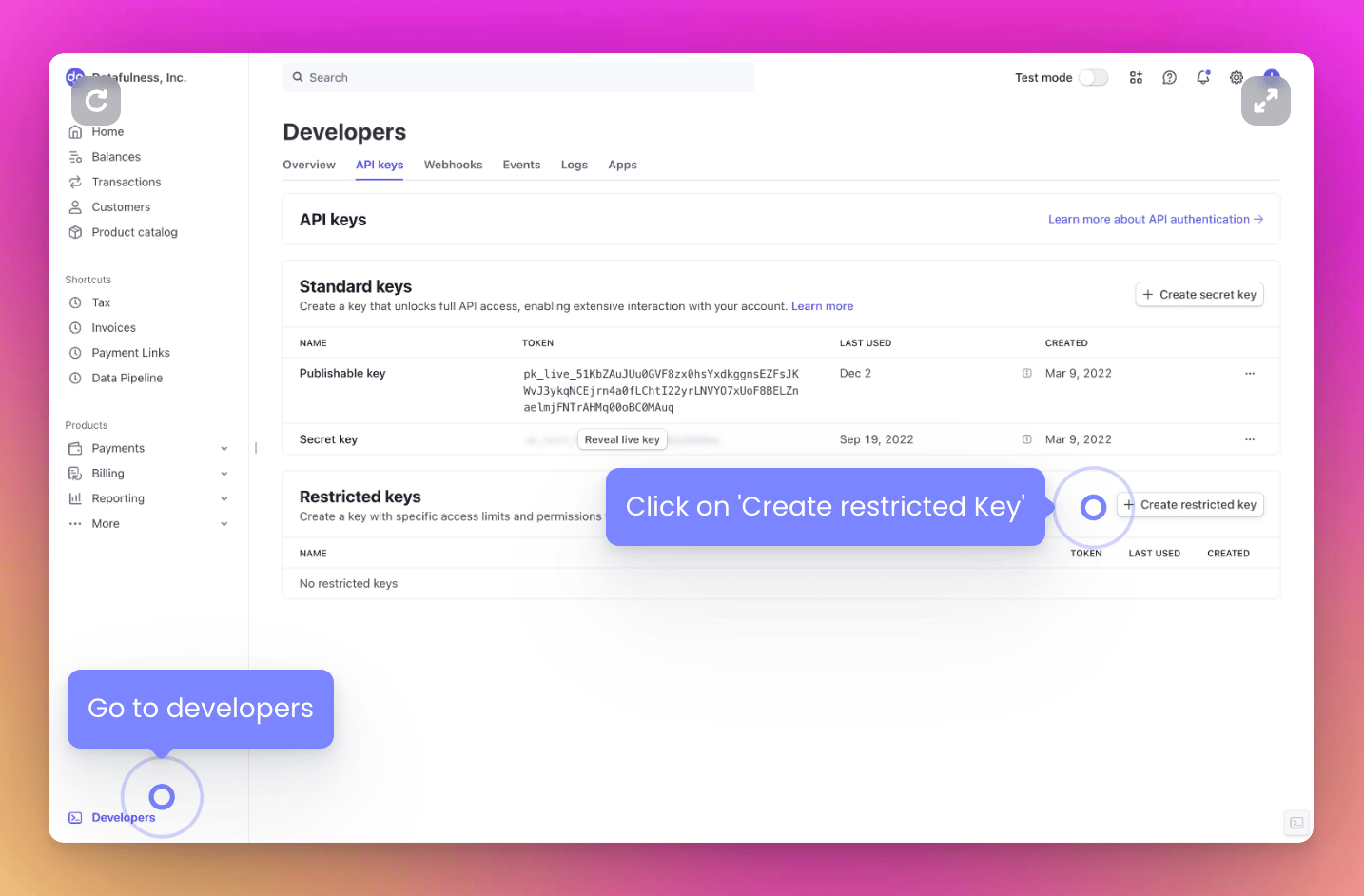
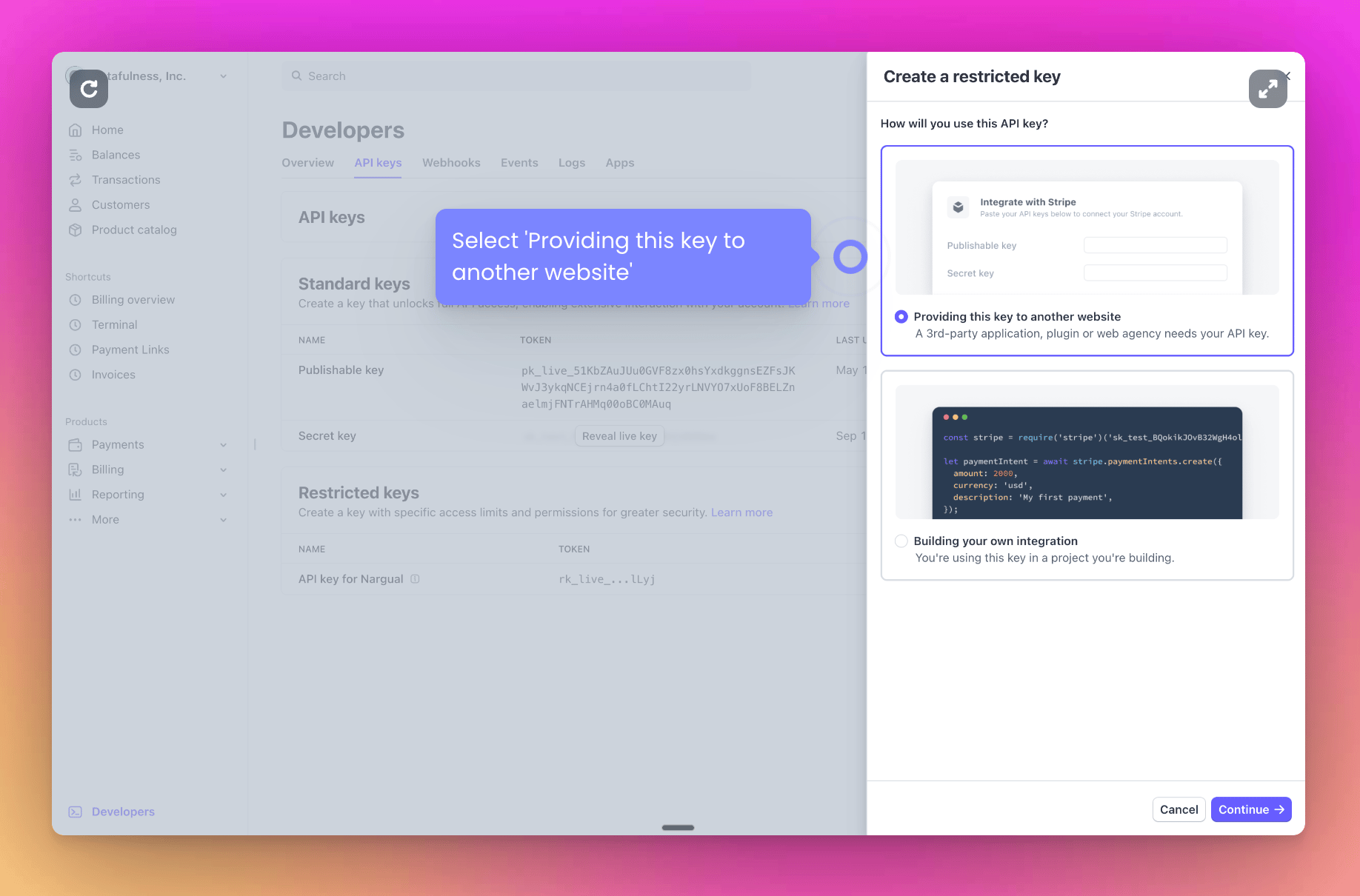
Go to [https://dashboard.stripe.com/apikeys](https://dashboard.stripe.com/apikeys) and click 'Create restricted key'
→ Select the first option: 'Providing this key to another website'
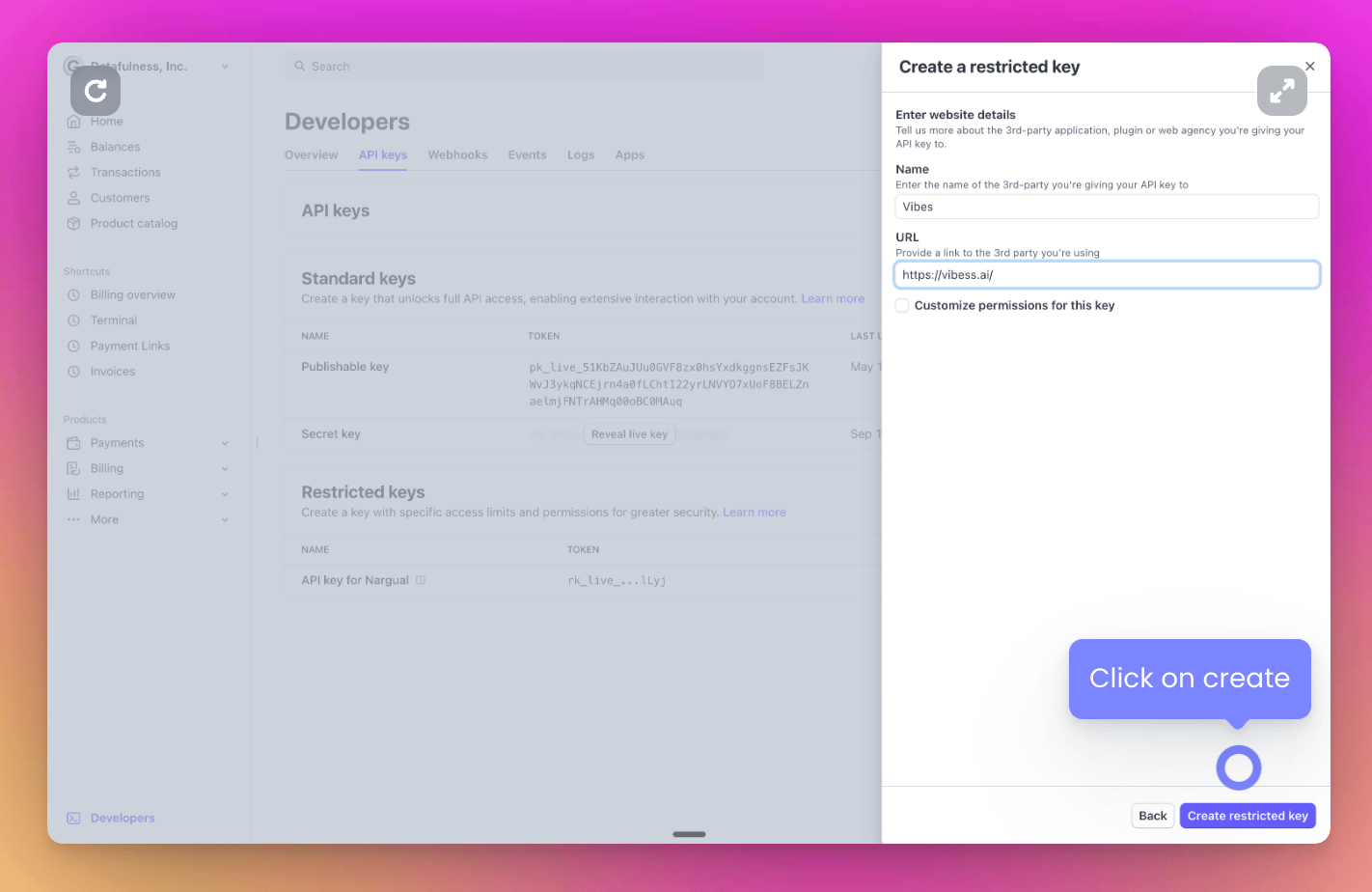
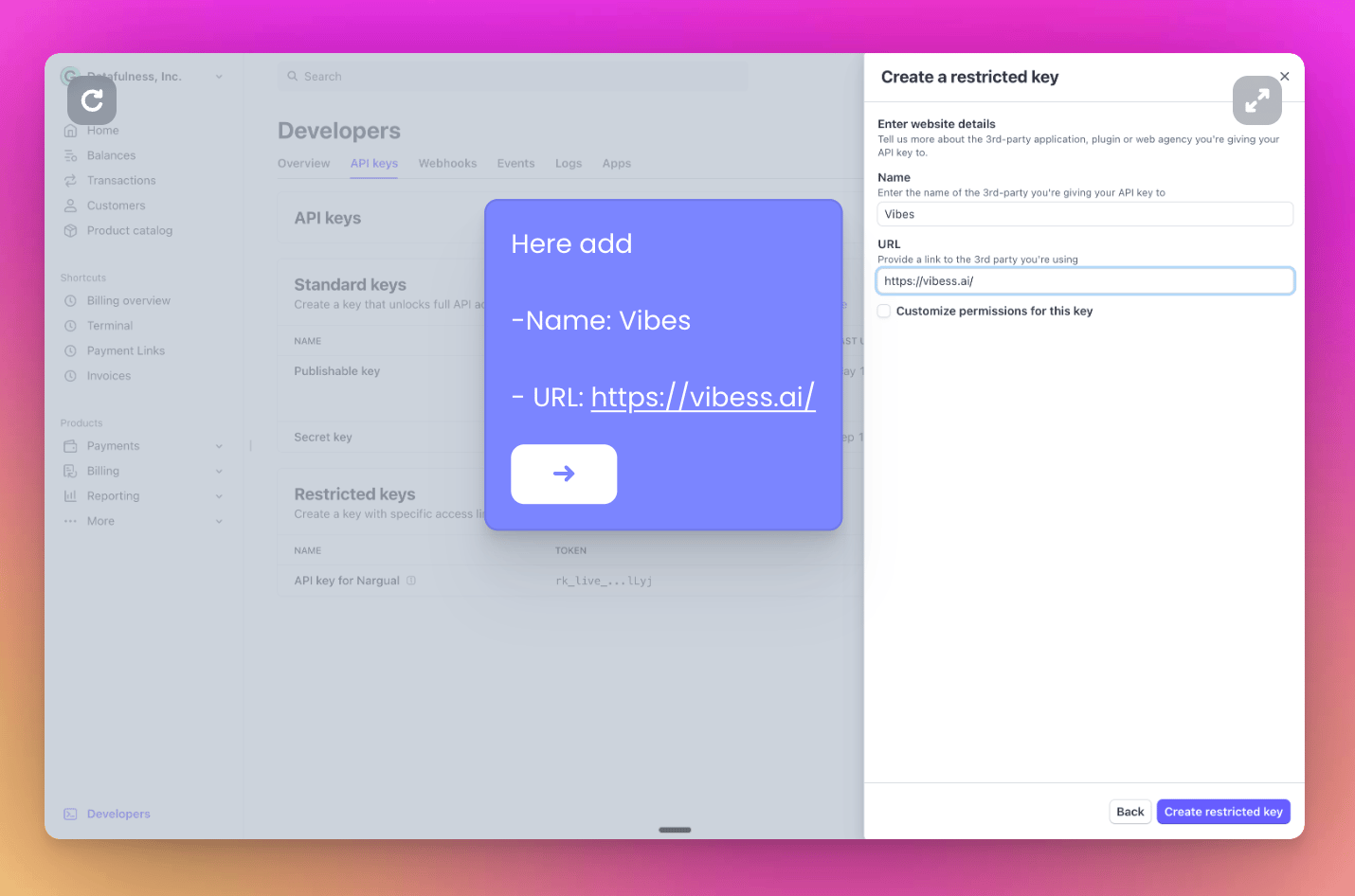
→ Now add a name and our website to identify your new key:
* Name: Vibes
* URL: [https://vibess.ai/](https://vibess.ai/)
→ Click on 'create restricted key' and copy your new API key. You'll paste it in your Vibes account
Click on 'Integrate with Stripe' and paste your API key
## 1️⃣ Import our JavaScript script
**Add this script to your web application:**
```javascript theme={null}
```
## 2️⃣ Create an HMAC signature
Choose your preferred language to implement authentication:
Remember to fill in your variables.
**Organization ID** and **Secret Key** in your account's settings page.
1. Log in to your account at [https://app.vibess.ai/login](https://app.vibess.ai/login)
2. Go to settings
3. Copy your Organization ID and Secret Key
```python Python theme={null}
import hmac
import hashlib
import json
def calculate_hmac(vibess_secret_key: str, external_user_id: str, churncut_app_id: int | str,
churncut_expiration_timestamp: str):
message = (external_user_id + churncut_app_id + churncut_expiration_timestamp).encode('utf-8')
return hmac.new(
vibess_secret_key.encode('utf-8'),
message,
digestmod=hashlib.sha256
).hexdigest()
vibess_secret_key = "your-secret-key" # We will provide you this
external_user_id = "cus_XXXXXXXXXXXXXX" # from stripe
token_expiration_timestamp = "1767139200" # replace this for any expiration date as a timestamp
vibess_app_id = 1 # we will provide you this number although in the future you may be abble to access it in our management app
print(calculate_hmac(vibess_secret_key, external_user_id, vibess_app_id, token_expiration_timestamp))
```
```javascript JavaScript theme={null}
const crypto = require('crypto');
function calculateHmac(vibessSecretKey, vibessUserId, vibessAppId, tokenExpirationTimestamp) {
const message = externalUserId + vibessAppId + tokenExpirationTimestamp
const hmac = crypto.createHmac('sha256', vibessSecretKey);
hmac.update(message);
return hmac.digest('hex');
}
// Example usage
const vibessSecretKey = "your-secret-key"; // We will provide you this
const externalUserId = "cus_XXXXXXXXXXXXXX"; // from stripe
const tokenExpirationTimestamp = "1767139200"; // replace this for any expiration date as a timestamp
const vibessAppId = 1; // we will provide you this number although in the future you may be able to access it in our management app
const hmacResult = calculateHmac(vibessSecretKey, externalUserId, vibessAppId, tokenExpirationTimestamp);
console.log(hmacResult);
```
```ruby Ruby theme={null}
require 'json'
require 'openssl'
def calculate_hmac(vibess_secret_key, external_user_id, APP_ID, token_expiration_timestamp)
message = external_user_id + APP_ID + token_expiration_timestamp
hmac = OpenSSL::HMAC.digest(OpenSSL::Digest.new('sha256'), vibess_secret_key, message)
return hmac.unpack1('H*') # Convert to hexadecimal string
end
# Example usage
vibess_secret_key = "your-secret-key" # We will provide you this
external_user_id = "cus_XXXXXXXXXXXXXX" # from stripe
token_expiration_timestamp = "1767139200" # replace this for any expiration date as a timestamp
APP_ID = 1 # we will provide you this number although in the future you may be able to access it in our management app
hmac_result = calculate_hmac(vibess_secret_key, external_user_id, APP_ID, token_expiration_timestamp)
puts hmac_result
```
```php PHP theme={null}
```
```go GO theme={null}
package main
import (
"crypto/hmac"
"crypto/sha256"
"encoding/hex"
"fmt"
)
func calculateHmac(vibessSecretKey, externalUserId string, vibessAppId string, tokenExpirationTimestamp string) string {
message := externalUserId + vibessAppId + tokenExpirationTimestamp
// Create HMAC
h := hmac.New(sha256.New, []byte(vibessSecretKey))
h.Write([]byte(message))
// Return the HMAC as a hexadecimal string
return hex.EncodeToString(h.Sum(nil))
}
func main() {
vibessSecretKey := "your-secret-key" // We will provide you this
externalUserId := "cus_XXXXXXXXXXXXXX" // from stripe
tokenExpirationTimestamp := "1767139200" // replace this for any expiration date as a timestamp
vibessAppId := "1" // we will provide you this number although in the future you may be able to access it in our management app
hmacResult := calculateHmac(vibessSecretKey, externalUserId, vibessAppId, tokenExpirationTimestamp)
fmt.Println(hmacResult)
}
```
## 3️⃣ Start a cancellation flow
Use the generated HMAC token to initialize the cancellation flow:
```javascript theme={null}
startCancellationFlow(
"cus_XXXXXXXXXXXXXX", // stripe customer id
"sub_xxxxxxxxxxxxxxxxxxxxxxxxx", // stripe current subscription
"xxxxxxxxxxxxxxxxxxxxxxxxxxxxxxxxxxxxxxxxxxxxxxxxxxxxxxxxxxxxxxxx", // Here goes your hmac token
"1767139200", // Expiration timestamp
"xxxxxxxx-xxxx-xxxx-xxxx-xxxxxxxxxxx" // vibess app id
)
// the info has to be the same as the one used to generate the hmac token
```
**Important:** Ensure all parameters match those used to generate the HMAC token
### Implementation Example
```javascript theme={null}
```
### **Alternative Integration: Email-Based Session**
If you don't have access to the Stripe Customer ID, you can integrate using the user's email. This method allows session-based identification and supports actions like subscription management or cancellation by matching the user's email address.
ATTENTION: This is not recommended unless you are sure that:
1. Your user accounts have unique emails in Stripe
2. Your users only have a single active subscription at a time
If these conditions are not met, you could get unexpected behavior.
Example:
```javascript theme={null}
startCancellationFlow(
null, null,
"3423613948ef3bef5a62d33ba58da022bebd72c21c30bca0dfae50606667647e", // Here goes your hmac token
"1767139200", // Expiration timestamp
"cbbb778e-afda-5ae5-82f4-c58dcafc7f1a", // vibess app id
"customer@company.com",
);
```
## Testing
* Use test mode in Stripe to verify the integration
* Confirm HMAC token generation with test credentials
* Verify cancellation flow triggers correctly
 → Now add a name and our website to identify your new key:
* Name: Vibes
* URL: [https://vibess.ai/](https://vibess.ai/)
→ Now add a name and our website to identify your new key:
* Name: Vibes
* URL: [https://vibess.ai/](https://vibess.ai/)
 → Click on 'create restricted key' and copy your new API key. You'll paste it in your Vibes account